If you spend time in the weird crossover-zone of football and dev twitter/X like me, you’ve probably seen this excellent first-person visualisation of Erling Haaland’s goal in the recent World Cup game (Iraq v Norway), showing exactly what it must have felt like being a 9th century farmer, casually minding your business before a viking raid:
And thanks to BBC sport I can https://t.co/z8FzHkIqtY pic.twitter.com/e7oeECbSft
— 🇵🇱 Moder on the Dancefloor 🇵🇱 (@jackalbion96) June 16, 2026
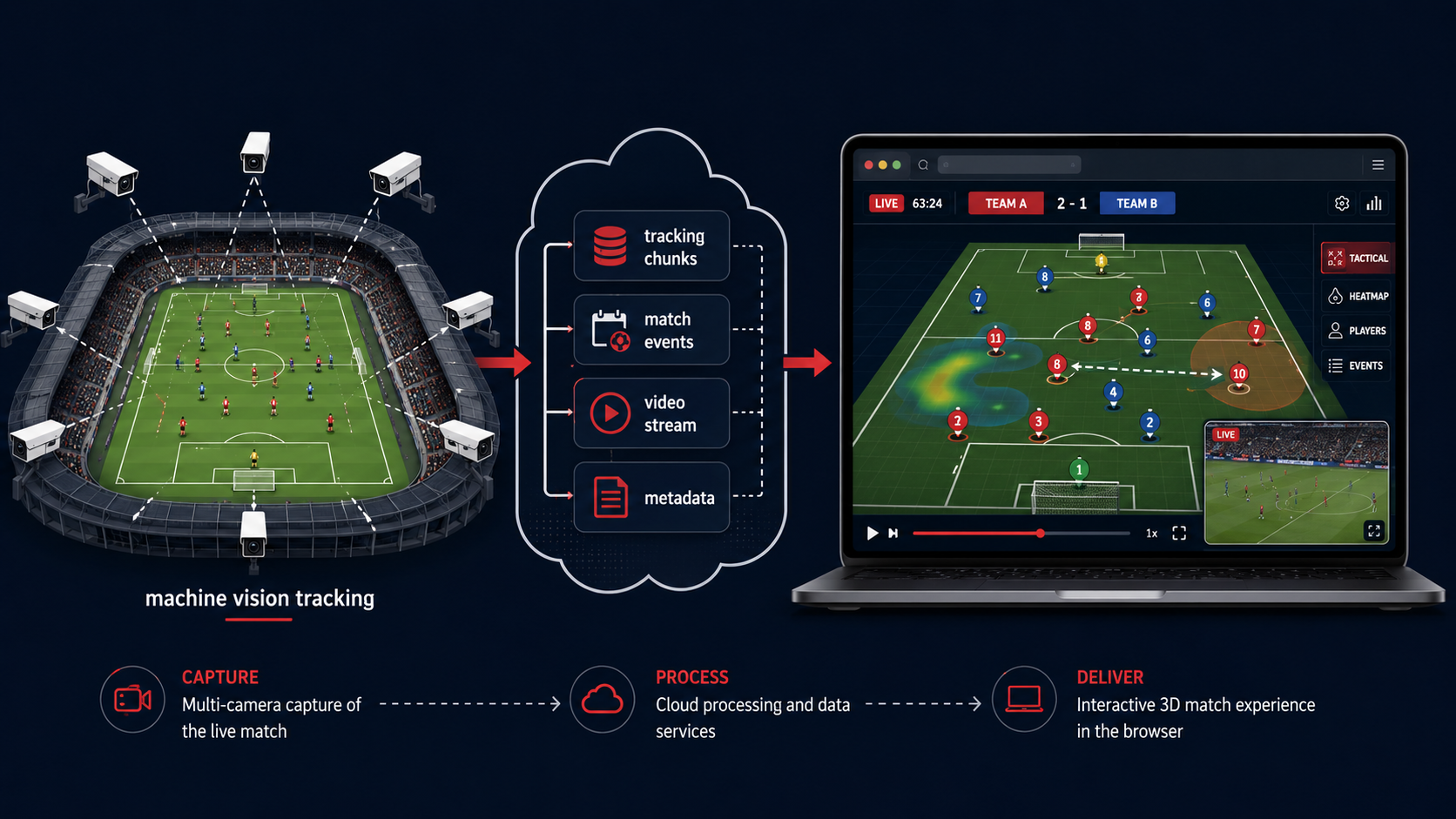
This is from BBC Sport’s beta “3D Live Match Experience”, a fascinating bit of broadcast technology: part football stream, part video game replay engine, part real-time data visualiser. Instead of just watching the normal TV camera feed, viewers can see a live 3D reconstruction of the match, with animated players, tactical overlays, alternate camera angles, and contextual data layered on top.
Under the hood, it appears to be doing something wonderfully ambitious: taking live tracking data from the stadium, shipping it to the browser, and using a Unity WebGL app to recreate the game in 3D. Not video, not prebaked animation shoehorned in to simple GPS data - It’s running a small, specialised match engine. Live. In your browser.
Let’s unpack how it seems to work. All of the technical data in this blog post comes from examining and reverse-engineering the client-side code served by the web app - there might be inaccuracies and missing information. The tech is built by Immersiv, a French company that specialises in XR sport experiences.
The short version
The system combines four major pieces:
-
Stadium tracking data Machine-vision cameras track the players, referees, and ball at high frequency.
-
A live 3D engine in the browser Unity WebGL receives the tracking data and animates a virtual pitch, players, ball, and camera system.
-
A normal broadcast video stream Shaka Player handles the live video feed, commentary, adaptive streaming, and DRM.
-
Real-time event and metadata services Firebase, Firestore, and Socket.IO handle match metadata, lineups, events, commentary cues, score state, and other live updates.
The browser is basically running a tiny football game
This isn’t just a simple 2D visualisation. It appears to be a full Unity WebGL application compiled from C# into WebAssembly.
Unity gives the developers a proper real-time 3D engine, including scene composition, animation systems, cameras, materials, shaders, input handling, and UI overlays. The browser receives the app as a WebAssembly bundle, then renders it through WebGL.
When you open the experience, your browser is doing something closer to launching a lightweight football game than loading a normal web page.
A rough boot process looks like this:
- The web page loads configuration and checks device capabilities.
- It detects available rendering and texture compression features.
- Firebase initialises, including anonymous authentication.
- The video layer starts loading via Shaka Player.
- The Unity WebGL runtime downloads and starts.
- The Unity app fetches match configuration and live metadata.
- Tracking data begins arriving in small binary chunks.
- The 3D scene starts animating at interactive frame rates.
- The video stream and 3D timeline are kept in sync.
The tracking data: not dots, skeletons
Examination of the data sent to the player every 3 seconds shows the live tracking feed is much richer than “player X is at coordinate Y”.
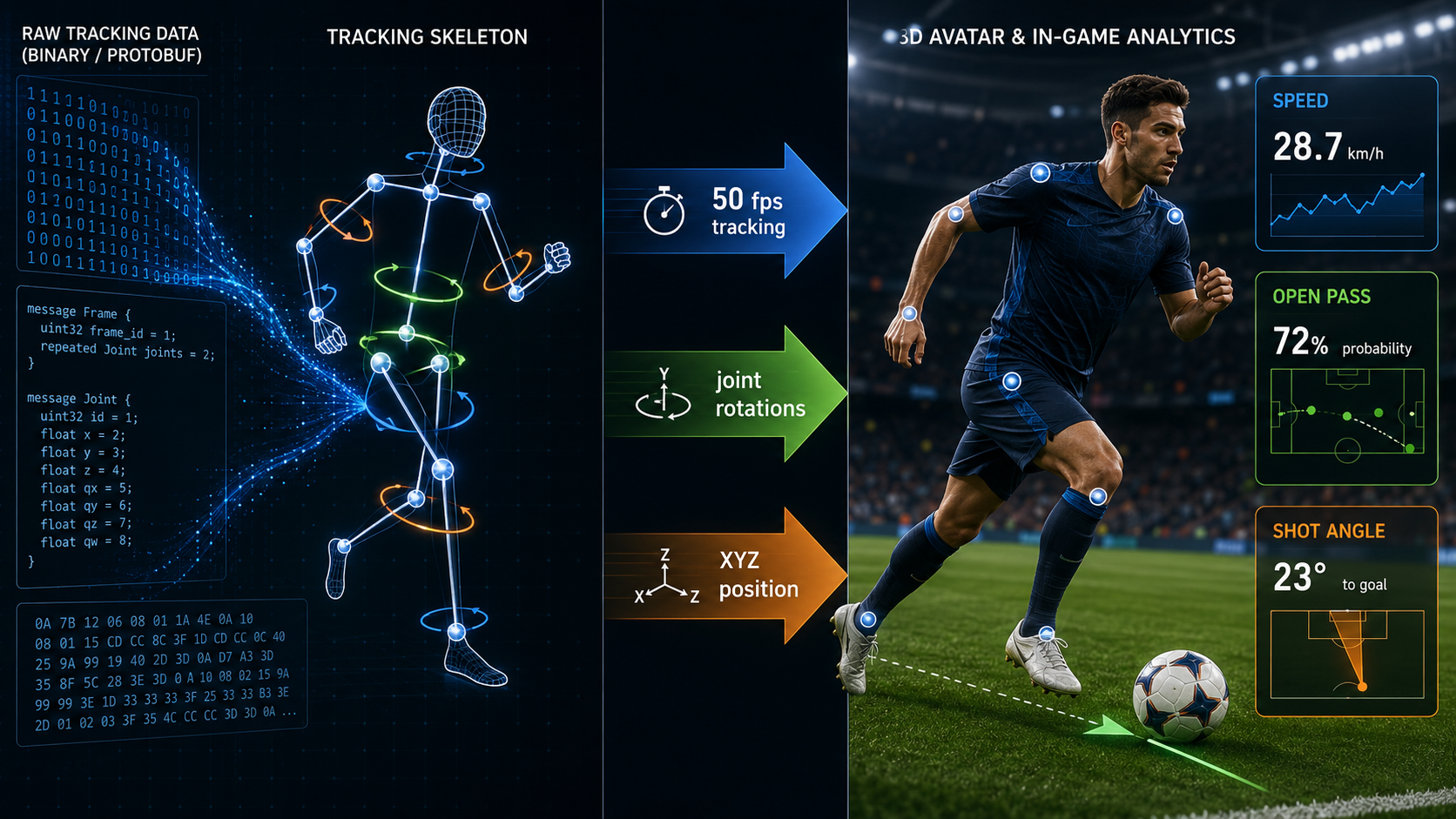
The captured tracking segment appears to contain data for:
- 22 players
- 3 referees
- the ball
- 50 frames per second
- roughly 3-second chunks
- around 32 skeletal joints per tracked human entity
- quaternion rotations for joints
- XYZ centroid positions
- player attributes such as team, shirt number, and speed
- match state values such as clock, period, and ball-in-play status
The data is encoded as binary protobuf-style messages, delivered in .ats files. Each file appears to cover a short span of match time, roughly three seconds, with individual frames separated inside the file. A single segment analysed in the report contained 150 frames, which lines up neatly with 50 fps over approximately three seconds.
At a high level, each frame seems to contain:
timestamp within segment
match state
entity positions
player identity and attributes
joint rotation data
ball state
period and clock data
frame separator
The joint rotations are stored as quaternions.
A quaternion is a compact way of representing 3D rotation without some of the awkward failure modes of Euler angles, such as gimbal lock. In game engines, quaternions are everyday plumbing. They are how you say “rotate this shoulder joint this way” or “turn this spine bone slightly” without turning the maths into soup. The browser receives a stream of compact 3D animation instructions, then Unity applies those rotations to player rigs.
Why split tracking into short files?
The tracking data appears to arrive as small HTTP-downloadable chunks, rather than one huge permanent WebSocket stream.
That sounds odd at first, but it makes a lot of sense.
Live tracking data is bulky. The analysed segment was several megabytes for just under three seconds of match data. At scale, serving that to large audiences is a CDN problem, not an application server problem.
By packaging tracking into immutable short chunks, the system can let CDN infrastructure do what CDN infrastructure is excellent at: serving static-ish files from the edge to lots of people at once.
That gives you:
- better scalability
- easier caching
- less pressure on live application servers
- resilience when viewers join late or buffer
- predictable data windows
- simpler replay and seeking behaviour
Meanwhile, genuinely live and irregular events can still use sockets or real-time database listeners.
That gives the system two lanes:
High-volume tracking data:
CDN-delivered binary chunks

Low-volume live events:
Socket.IO and Firestore-style real-time updates
The overlay system: some things are official, some things can be computed locally
A live 3D match visualiser needs more than animated players. The fun comes from overlays: speed badges, shot distances, open passing lanes, formations, player focus, and tactical views.
The report suggests these overlays likely come from two broad categories.
1. Server-curated events
Some events need an official or central source of truth:
- goals
- cards
- substitutions
- VAR decisions
- score changes
- confirmed match clock state
- commentary events
You do not want every viewer’s browser deciding whether a goal has officially happened. That belongs to the event and metadata layer.
2. Client-computed analytics
Other overlays can be calculated directly from the tracking data:
- sprint detection
- current player speed
- shot angle
- shot distance
- open passing lanes
- offside line estimates
- formation shape
- heatmaps
- player focus camera cues
If every browser already has the raw player and ball positions, then the browser can compute many overlays locally. For example:
If a player’s speed crosses a threshold:
show a sprint badge.

If the ball velocity jumps toward goal:
calculate shot distance and angle.

If a pass lane between two teammates has no defender near it:
highlight the receiver as open.
Doing this in the Unity app avoids a round trip to the server. That means the overlay can appear as soon as the local tracking data crosses a threshold. It also means the broadcaster does not need to run millions of tiny analytics calculations server-side for every viewer.
That is a neat trick: send the raw state once, then let each client derive the fun bits.
Video sync: matching the real broadcast to the 3D world
The experience also includes broadcast video and commentary. That video appears to be handled through Shaka Player, a mature adaptive streaming library used for HLS and DASH playback.
It’s kept in sync with the action with PROGRAM-DATE-TIME tags that can associate video segments with real wall-clock timestamps. If the tracking chunks also use absolute or segment-relative timestamps, the Unity app can line up the 3D match state with the video stream:
Video says:
“I am currently showing 20:14:37.200 UTC.”

Tracking data says:
“This skeleton frame corresponds to 20:14:37.200 UTC.”

Unity says:
“Lovely. Put the striker’s foot there, the ball there, and the camera here.”
That makes it possible to join mid-match, buffer, seek, or recover from stream drift while keeping the 3D view and commentary aligned. You can even go back and watch whole matches, highlights, or any particular part you want, from whatever perspective you want.
Why Unity WebGL?
There are other ways BBC and Immersiv could have built this. They could have used raw Three.js, Babylon.js, WebGPU directly, or a bespoke renderer.
Unity WebGL brings trade-offs.
The downsides
Unity WebGL apps are not tiny. There is a sizeable WebAssembly payload, asset bundle, runtime framework, and loading process. Startup cost matters, especially on mobile or weaker devices.
It also means the experience has more of a game-like runtime architecture than a normal web app. That can make debugging, accessibility, and deep browser integration more complex.
The upside
Unity gives you a mature engine for:
- skeletal animation
- camera systems
- interpolation
- scene rendering
- real-time UI
- asset pipelines
- cross-platform behaviour
- C# gameplay logic
- frame-based simulation
For something that is effectively “FIFA replay mode, but live in a browser”, Unity is an understandable choice.
The key word is live. A normal broadcast graphic can be pre-rendered, composited, or manually triggered. This system needs to ingest a constant stream of spatial data and produce an interactive reconstruction immediately.
That is game engine territory.
Rendering the match
Once the tracking frames arrive, the rendering pipeline appears to be roughly:
- Decode the binary tracking data.
- Extract entity positions, player IDs, attributes, and joint rotations.
- Apply rotations to a skeletal rig for each player and referee.
- Interpolate between tracking frames for smooth rendering.
- Place players, referees, and the ball into a virtual stadium.
- Run overlay calculations.
- Pick camera angles or respond to user camera controls.
- Draw the final scene to the WebGL canvas.
The tracking data appears to run at 50 fps, while the Unity scene can render at a browser-friendly frame rate such as 60 fps. That mismatch is normal. The engine can interpolate between tracking frames so motion remains smooth. Note, 50fps is the PAL broadcast standard - BBC being British and Immersiv being French, it makes sense, plus it eases sync with the commentary stream.
Without interpolation, a 50 fps tracking stream rendered at 60 fps could feel subtly juddery. With interpolation, Unity can estimate the in-between pose and keep the player motion fluid.
This is the same basic family of problems that game networking, animation blending, and sports replay systems deal with all the time. You rarely display raw state directly. You display a carefully smoothed version of it.
The security model: protected video, ordinary tracking transport
The report suggests the video stream uses conventional DRM such as Widevine or FairPlay. That is expected for broadcast video rights.
The tracking data, though, appears to be protected mainly by normal web transport and access controls: HTTPS, authenticated app sessions, non-listable storage, and likely signed or controlled URLs. The .ats payload itself does not appear to have an additional custom encryption layer beyond transport security.
The interesting design choice is not “can someone inspect the data?” It is “how much of the experience should run locally, and how much should remain server-side?”
For this kind of product, local computation appears to win.
Why this is technically exciting
The impressive part is not any one technology. It is the combination.
Unity WebGL? Known quantity.
Shaka Player? Known quantity.
Firebase and Socket.IO? Known quantities.
CDN-delivered binary chunks? Known quantity.
Skeletal tracking? Known quantity in elite sport and game development.
But put them together and you get something genuinely new for mass-market sports broadcasting: a browser-delivered, live, interactive 3D reconstruction of a football match.
The innovation is in the pipeline:
Real stadium
→ machine vision tracking
→ compact skeletal data
→ CDN chunks
→ browser game engine
→ live animated match world
→ synced broadcast video
→ client-side tactical intelligence
That is a very different shape from traditional broadcast graphics. Rather than the broadcaster rendering one canonical view for everyone, the client receives enough structured data to generate its own view.
Today that means alternate cameras and overlays. Tomorrow it could mean personalised tactical analysis, accessibility-focused views, coaching tools, fantasy football integrations, kids’ explainers, referee perspectives, or “show me only my team’s defensive shape” mode.
Once the match becomes data, the broadcast stops being a single rectangle.
It becomes a navigable object. And now you can watch in recreated first-person to really determine the question of whether “my nan with no legs could have done better there” (hint: no, see the Haaland clip from the beginning of the blog post).
The big picture
As well as being a glimpse of where sports broadcasting is heading, this 3D experience could make its way into genuine sporting pipelines too. My guess is that the same network of machine vision cameras that power refereeing aids like Semi-Automated Offside Tech is also providing this rich tracking data, and the value to post-match analysis is clear - you can break down a passage of play from any conceivable angle or perspective, looking at team or individual performances with fine-grained body-tracking detail. You could even adopt a “refs-eye-view” (without them having to wear one of the silly headcams the World Cup refs are wearing that make them look like Borg Drones) to see if you could really make a decision better than the referee on that particular day.